
Some of the issues you should think about in comparing different grant management systems are: features, performance, reliability and availability, security and privacy, ease of use, scale, flexibility and adaptability, pricing, support and ease of migration and integration.
The following table lists some of the pricing considerations for grant management systems. The table is not comprehensive but provides some of the typical pricing components for grant management systems or software.
| Costs | Description | Common Grant Application | Competitor |
|---|---|---|---|
| Server and backup hardware | The one-time cost to buy a server and backup hardware. | $0 | |
| Installation | The one-time cost to install a server and install the grant management software on the server. | $0 | |
| Training | The one-time cost to undergo training on how to setup, configure and use the hardware and software for the grant management system. | $0 | |
| Maintenance | The continuing cost to receive new features and bug fixes for the grant management system. | $0 | |
| Customization | The one-time cost to receive custom new features for the grant management system. | $0 | |
| Support | The continuing cost to receive email or phone support if you have a question about how to use the grant management system. | $0 | |
| Per user cost subscription | The continuing cost for every user that is allowed to use an account (sometimes called a seat license or floating license). | $0 | |
| Annual subscription | The annual subscription cost to use the grant management system. | $0 | |
| Monthly subscription | The monthly subscription cost to use the grant management system. | Varies | |
| Per application or per transaction | The per application or per transactiton cost to use the grant management system. | $0 | |
| Storage | The per GByte of storage cost to use the grant management system. | $0 | |
| Transition | The one-time cost to move applications and reports, applicants and users from an existing to a new grant management system. | Optional small additional charge | |
| Contract negotiation | The one-time legal cost to negotiate a contract with the grant management system provider. | $0 |
When an application is submitted to a grantmaker, the information for the application and documents associated with the are copied to the grantmakers account. The applicant can edit and change their information or supporting documents after an application has been submitted to a grantmaker, but their changes will not appear in the grantmakers version of the application or supporting documents. This is to ensure the integrity of the application (i.e. that it cannot be changed by the applicant without the grantmakers knowledge). The grantmaker can, at their discretion, edit and update all fields of a submitted application. Grantmakers that receive paper-based applications may also enter those paper-based applications and upload their supporting documents directly into the system, and make them part of the same database and workflow processes as the applications received from the Web.
The grantmaker can specify whether they have continuous or discrete grant cycles. If the grantmaker uses discrete grant cycles, they can specify one or more cycles and the following dates associated with each cycle: open date, close date, notification date and funding date. Cycles do not have to be equal in length and they can cross year end boundaries. An application cannot be submitted to the grantmaker after the close of a discrete grant cycle.
The system examines a number of filtering criteria specified by the grantmaker to determine if an application submitted by an applicant will be presented to a grantmaker for consideration. An application will be presented to the grantmaker if: the grantmaker accepts unsolicited applications or the grantmaker accepts solicited applications and the applicant has a valid invitation from the grantmaker and the application date falls between the open and close dates of the grantmakers grant cycle and the application meets the grantmaker's other filters and all required questions are answered. If the application does not meet any of the specified criteria, it will not be presented to the grantmaker. Criteria specified by one grantmaker, are completely independent of criteria specified by another grantmaker.
We provide eligibility quiz functionality, without a separate and explicit eligibility quiz. The system examines a number of filtering criteria specified by the grantmaker to determine if an application submitted by an applicant will be presented to a grantmaker for consideration. If the application does not meet any of the specified criteria, it will not be presented to the grantmaker.
Grantmakers that receive paper-based applications may enter those paper-based applications and upload their supporting documents directly into the system, and make them part of the same database and workflow processes as the applications received from the Web. We do not charge any fees for paper-based applications entered by grantmakers.
The system generates a number of automatic emails, depending on the settings of both the applicant and the grantmaker. Emails are automatically generated to the applicant acknowledging that an application has been successfully submitted to a grantmaker, whenever the status of an application changes (i.e. it has been approved, rejected, deferred, etc.) and every time a charge has been made to their account. Emails are automatically generated to the grantmaker whenever an application has been received from an applicant and every time a charge has been made to their account. All emails point back to the website for more detailed information.
The more detailed information is available after a user logs in. It is updated in real-time. The information has fixed and customizable fields. If an application is rejected or deferred, the grantmaker can specify the reason for the rejection or deferral. A short text reason as well as longer narrative text reason is configurable by the grantmaker. The system supplied reasons are usable by all grantmakers. The grantmaker may review, but not edit, the system supplied reasons. The grantmaker may also add and edit reasons that are only visible to the specific grantmaker. The system supplied and grantmaker supplied reasons are available for use by the grantmaker every time they reject or defer an application.
Grantmakers can change and manage the status of an application by receiving, accepting, rejecting and deferring an application. Additional status information can also be changed and managed. Emails are automatically generated to the applicant acknowledging that an application has been successfully submitted to a grantmaker and whenever the status of an application changes (i.e. it has been approved, rejected, deferred, etc.).
Grantmakers can enter funding decisions by accepting an application and indicating the amount approved, payment schedule and whether a report is required or not. Approval of an application will automatically generate an email to the applicant indicating the status of their application has changed (i.e. it has been approved).
The grantmaker can setup any number of application forms. Only one application form can be attached to a program at a time. The same or different forms to each program.
There is no limit on the number of applications that may be submitted to a grantmaker.
The system currently offers three mechanisms for evaluating applications. The mechanism that is used may be configured. There are two rating mechanisms and one ranking mechanism. In all cases it is also possible for notes and comments to be entered for each application. One or more account users may be allowed / required to provide application evaluations. The evaluations may be visible to all other application evaluators, or only by the account owner.
Questions configured with answers that are text strings can limit the length of the answers. These limits may range up to 1000's of characters.
We are constantly updating and upgrading the capabilities of our system.
Since our system is Web-based, it is relatively easy to test and ensure that the operational behavior of our system meets our user requirements and design goals. The more difficult part of the development process is defining the user requirements. The definition and development of new user requirements is driven by our own thinking as well as unsolicited and solicited feedback from applicants and grantmakers.
We use the agile software development model. We deploy new features, enhancements and fixes on an ongoing basis as they become available and after they have been thoroughly tested. Generally speaking, deployment of new upgrades and updates is done without affecting the availability of our system.
There are no maintenance or upgrade fees for the system. Setup, maintenance, support and software upgrades are all included in the monthly subscription fee.
The grantmaker will need to spend a little bit of time thinking about how their current grantmaking process works, and how it will map into our online process. We will help the grantmaker work through the questions they'll need to ask themselves, provide guidance about how our system works and then work with the grantmaker to ensure our system will do what they need it to do.
The following steps are typically required to get up and running as grantmaker.
The grantmaker does not need to install any software. All the grantmaker needs to use our system is a Web browser and Internet access.
We offer unlimited setup assistance and training and ongoing support to the grantmaker.
Training takes many forms and is customized to suit the particular grantmaker. We offer training support by email and telephone on a one-on-one or group basis. We also provide grantmaker specific Webinars or online meetings, in which we can train administrators and/or evaluators. The content of the meetings can be customized and depends on the skill level of the users and their particular needs. We can also offer on-site training for an additional charge.
The Common Grant Application is a hosted solution. The grantmaker and applicant do not need to install, support or maintain any hardware or software. The only requirement to use the system is that a user has a Web browser and Internet access. The Common Grant Application will maintain and support the hardware and software on its server(s) as needed. The Common Grant Application is constantly improving and adding new features and capabilities. Software and database upgrades are generally performed without any need to disrupt our system's availability (i.e., the system's architecture allows us to update the software and database on a running system). Backup operations are also performed without any need to disrupt the system's availability.
After the initial setup and training we offer unlimited ongoing support by email and telephone on an as-needed basis. If the grantmaker has a usage question, they can contact us by email or phone.
We also offer unlimited training and ongoing support to all applicants using the system, at no charge to the applicant and no additional charge to the foundation.
We're glad to work with independent consultants.
Our system can support any number of different grantmaker programs. Each program can be independent of the other and may be one or two step (application or LOI and application) and have different application submission filtering criteria, evaluation criteria and evaluator groups. Each program grant cycle may be continuous or have one or more discrete windows per year during which applications may be received.
No. Grant cycles are one of many configurable options. The system can be setup and configured without our assistance (many grantmakers have done this) but we recommend that we assist in the initial setup and turn on of the account. That way we can help walk through any data mapping and process issues.
- Guideline creation
Our system can support a one-step or two-step application process. The one-step process is application only. The two-step process is a LOI followed by an application. After setup the account is enabled and applicants may start to submit LOIs and/or applications.
- LOI
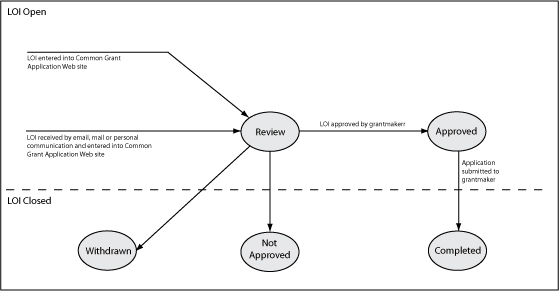
For a two-step process the first step will be for an applicant to submit a LOI. After a LOI is received it moves to the "Review" state. In the review state, depending on whether or not evaluations are required, the LOI is evaluated (i.e. rated and scored). At the conclusion of the evaluation process by the grantmaker the LOI is either accepted or rejected by the account owner or administrator. If rejected, the applicant will not be allowed to submit an application for the program that was used to submit the LOI and the LOI will be moved to the "Not Approved" state. If accepted, the applicant can then submit an application for the same program that was used to submit the LOI. The LOI will be moved to the "Approved" state. The state machine for LOIs is shown below.
- Application
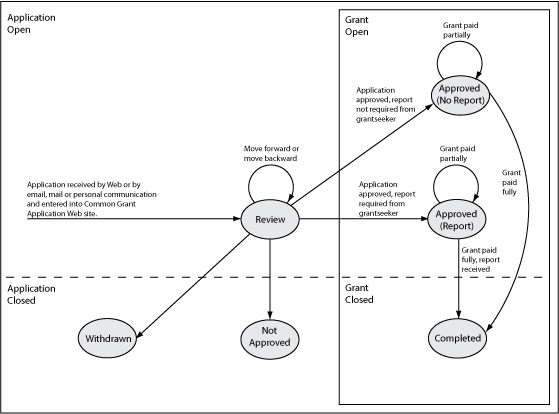
For a one-step process the first step will be for an applicant to submit an application. For a two-step process the applicant must have submitted an LOI that was accepted before they are able to submit an application. After an application is received it moves to the "Review" state. In the review state, depending on whether or not evaluations are required, the application is evaluated (i.e., rated and scored). At the conclusion of the evaluation process by the Foundation the application is either accepted or rejected by the account owner or administrator. If rejected, the applicant is notified and the application is moved to the "Not Approved" state. No further action is required. If accepted, the grantmaker specifies whether or not one or more reports are required and the application becomes a grant and is moved to the "Approved (Report)" or "Approved (No Report)" state. After all payments have been made and all required reports are received, acknowledged and approved the grant is moved to the "Completed" state. The state machine for applications is shown below.
Applicants may register on the Web site and then enter their information in any order and over any time frame they wish. Any information that has been entered and saved or any documents that have been uploaded will always be available for future use or applications. The applicant may also research and review grantmakers, funding interests, guidelines and deadlines at their own discretion. Once a grantmaker has been identified, the applicant may submit an application through a few simple sequential steps. An applicant creates an application by selecting a grantmaker and then the grantmaker program. Applications will not be submitted by the system to grantmakers unless they contain the grantmaker's required information and pass the grantmaker's filtering criteria. Changes in the status of the application are reported automatically to the applicant by email and updated on the system in real-time.
The information can be easily reused for subsequent applications to the same or different grantmakers. We have observed extensive use of this capability on our system.
We currently recommend the applicant submit the paper information to the grantmaker and indicate the application on the submitted paper. The foundation can then either file the paper or scan it themselves and then upload and attached the document to the application. It should also be noted the system allows the grantmaker to add complete paper-based applications and their associated documents to the system. Our current experience indicates that most grantees appear to have electronic versions of their important documentation.
Each grantmaker or applicant account may have one or more users. There is no limit on the number of users for each applicant or grantmaker account. Each user may have different permissions within the account. The permissions control what information in the account may be reviewed and/or changed.
Secure password protected access is supported for every user account in of the system. The user specifies their own user name and password when they register an account. The user may change their user name or password at their discretion. Applicants cannot access other applicant or grantmaker user accounts and grantmakers cannot access other grantmaker or applicant user accounts.
Yes. Applicants can maintain information about their organization as well as information about one or more of their organization's programs. Applicants may enter their organizational and program information in any order and over any time frame they wish. They can work on entering some information, go away, and come back minutes or months later, and the information will still be there. The information is persistent and may be reused and does not need to be re-entered for each application. An applicant creates an application by selecting a program, and a grantmaker that the selected program will be submitted to as an application. The system automatically binds together the applicant's organization and program information which becomes the application to the grantmaker. This method allows maximum flexibility and re-use of the information.
Yes. All applications submitted by an applicant to a grantmaker are persistent. The applications and their real-time status are always available for viewing by the applicant and grantmaker.
Applicants may upload, delete and review documents describing their organization and/or the various programs for which they are seeking funding. The documents are uploaded using the Web browsers upload capabilities. These documents may be used for general informational purposes, to support applications or to support grant reports. Some document formats that are supported include: Word, Acrobat, Excel, JPEG, GIF, and TIF.
Each document uploaded by the applicant and submitted as part of an application is viewable by the grantmaker directly from their Web browser. Each viewable document is hyperlinked, and may be viewed by simply clicking on that hyperlink. The document is opened in the browser using the appropriate application (e.g. Word, Excel, Acrobat, etc.). The document may then either be opened for viewing or saved to the local environment of the grantmaker.
Applicants or grantmakers do not require any special software to use the Common Grant Application. All that is required is a Web browser and Internet access. We are independent of the users underlying operating system. Our software is tested against the Chrome, Edge, Firefox, and Safari Web browsers. Our system is also independent of any particular user applications, although if a user would like to review or open a received document that was created using a particular application, that application must be on the user's computer (e.g. Microsoft Word).
Yes, the current size limitation is 100 MB per document.
The grantmaker account may have one or more users. There is no limit on the number of users for the grantmaker account. The account owner and administrator can set separate account permissions for each user in the grantmaker account. These permissions are: owner, administrator, evaulator, reviewer (detailed), reviewer (summary). The permissions affect the detail of what the account users are able to view, change and evaluate. The scoring and evaluation capabilities allow the account owner to define the method to be used (rating, ranking, notations) and the visibility of the scores between users. Users with an account type of Owner, Administrator or Evaluator may be assigned to evaluator groups for the purpose of evaluating applications. Evaluator groups may be empty or consist of one or more users. The account permissions are:
| Name | Summary Description |
|---|---|
| Owner | Create new user accounts, setup and change organization and program information, review applications, evaluate applications, approve and reject applications, create and run custom reports. |
| Administrator | Create new user accounts, setup and change organization and program information, review applications, evaluate applications, approve and reject applications, create and run custom reports. |
| Evaluator | Review organization and program information, review applications, evaluate applications. Run custom reports. |
| Reviewer 0 | Review organization and program information, review applications. Run custom reports. |
| Reviewer 1 | Review organization and program information, review applications. Run custom reports. |
| Reviewer 3 | Review organization and program information, review applications. Run custom reports. |
All applications and their associated documents can be reviewed online, although it is possible to export and/or print the information for use by those that would prefer paper. Account owners and administrators can record notes on each application. To record their notes they go to the application and click on an Edit Notes button. Each evaluator can record their scores, application notes and evaluation question notes on each application. To record their notes they go to the application and click on the Edit Evaluation button.
None of the account owner's or administrator notes, or evaluator scores and notes are ever visible to the applicant. The account owner or administrator can configure whether or not evaluators within an evaluator group/program can see each other's scores and notes. The account owner or administrator can also configure whether or not evaluators outside of the evaluator group/program can add their own score or notes. Owners and administrators can always see all evaluator's scores and notes. There are a number of standard reports that display various fields of the evaluator's scores and notes by evaluator or by application. One or more evaluations can also be saved or exported as a PDF file. If multiple evaluations are selected they will be saved into a single PDF file pre-pended with a table of contents.
The evaluation processes are independent for each grantmaker program. Every program may have the same rules and information, or they may be different from each other.
The account owner or administrator sets up the evaluation rules. These include:
These rules are applied to applications as they are received. None of the evaluation information is visible to the applicant. The owner or administrator may, if necessary, change the assigned grantmaker program, assigned evaluation scale and/or assigned evaluator group after an application has been received.
Owners, administrators and evaluators may all be assigned to evaluator groups. Applications are available for evaluation the moment they are received. Evaluators can either periodically login and visit the Web site to identify new applications that have been received, or select whether or not they would like to receive an email when an application is received. After completion of the grantmaker evaluation process, the owner or administrator then may either accept or reject the application. Evaluators and reviewers cannot perform this step.
There are 3 standard evaluation scales, and 2 custom evaluation scales. Owners or administrators select and setup the scale that will be used for evaluations and evaluators simply use the scale. The possible scales are:
| Name | Description |
|---|---|
| Rating (Non-numeric Scale: Yes, No, Maybe) | A non-numeric scale allowing the evaluator to score an application with a yes, no or maybe. |
| Rating (Numeric Scale: 0 - 4) | A numeric scale allowing the evaluator to score an application from 0 (meaning the evaluator recommends the application not be approved) to 4 (meaning the evaluator recommends approval of the application). |
| Rating (Numeric Scale: 1 - 5) | A numeric scale allowing the evaluator to score an application from 1 (meaning the evaluator recommends the application not be approved) to 5 (meaning the evaluator recommends approval of the application). |
| Ranking (Numeric Ranking) | A numeric ranking scale of any value allowing evaluators to rank an application against other applications being evaluated. This is the most flexible option (because evaluators can enter any numeric value when making their evaluation), but this flexibility also means that applications aren't rated on a single defined scale. |
| Rating (Numeric Scale: Custom by Column) | A user defined scale with one or more questions, one or more scoring ranges for all questions and descriptive text of how questions should be scored within each allowable scoring range. The scoring ranges are the same for all questions. |
| Rating (Numeric Scale: Custom by Row) | A user defined scale with one or more questions, one scoring range per question and descriptive text of how each question should be scored within the allowable range. The scoring ranges may be different for each question. |
The grantmaker specifies the amount approved at the time they approve the application. The grantmaker can then break this down into one or more amounts approved, scheduled and paid. We currently work with a payment gateway to manage subscription fee and per application fee payments. In the future we plan to add a capability that will allow direct EFT to the applicant.
Applicants can set their personal preferences so that they can receive an email when the status of an application changes. They can also log in to the system at any time to check the real-time status of an application. At the time a grantmaker approves an application they are asked to provide the following information (as necessary):
If an online agreement is required, the grantmaker may use agreement text from a template, or tailor the agreement text for each individual applicant. If one or more reports are required, the grantmaker may provide the report guidelines text from a template, or tailor the report guidelines text for each individual grantmaker. The amount approved, notes, grant agreement information and report information are all associated with the approved application and viewable by the applicant any time after the application has been approved.
If an online based agreement is used by the grantmaker, it may be reviewed and accepted or rejected by the applicant. The applicant's agreement page will show the agreement and provide a response section that will allow the applicant to either accept or reject the agreement, and also provide any additional response that will be viewable by the grantmaker. The agreement can be changed by the grantmaker until it has been accepted by the applicant. It cannot be changed by the applicant. Grantmakers can set their personal preferences so that they can receive an email when a agreement is received.
If one or more reports are required by the grantmaker, they may be uploaded by the applicant at any time. The grantmaker may then review the reports online, acknowledge their receipt and indicate to the applicant when all reports have been accepted and approved. Grantmakers can set their personal preferences so that they can receive an email when a report is received.
Applicants can set their personal preferences, so they can receive an email when the status of an application changes. They can also log in to the system at any time to check the real-time status of an application. At the time a grantmaker rejects an application they are asked to provide the following information:
The system provides a set of standard reject reasons but the grantmaker may create their own reasons with an associated description. The reject reason, description and notes are all associated with the rejected application and viewable by the applicant any time after the application has been rejected.
The system provides a link to the IRS Publication 78 Web page with the appropriate organization name provided for the IRS search function. Similar links are also provided to Guidestar and other Web sites.
There are different types of information and reports available for online review, printing and export by the grantmaker. Aggregate application statistics are accumulated for all applications and grants. Some general statistics are accumulated as well as statistics for applications received by method, by cause and by type and statistics for applications and grant approved by cause and by type. These reports can be printed directly by using the Web browser print function.
The grantmaker manages the export of application information by creating a custom report. The custom report is configurable by the grantmaker and allows the grantmaker to select filtering criteria, sorting criteria and which fields they would like to see in the report. All fields in the application are available for the report. Each custom view is savable and may be reused. The resulting report listing one or more applications or grants may then be exported into a CSV file. The CSV file may be opened for viewing or saved to the local environment of the user for use by an external spreadsheet or database application.
One or more complete applications or grants can also be saved or exported as a PDF file. If multiple applications or grants are selected they will be saved into a single PDF file pre-pended with a table of contents.
Each document uploaded by the applicant and submitted as part of an application is viewable by the grantmaker directly from their Web browser. Each viewable document is hyperlinked, and may be viewed by simply clicking on that hyperlink. The document may then either be opened for viewing or saved to the local environment of the grantmaker.
Yes. All reports can be exported into a CSV/Excel file that may be opened for viewing or saved to the local environment of the user for use by an external spreadsheet or database application. Our system is independent of the underlying word processing, spreadsheet or other applications.
Emails sent by the system that are bounced, are returned back to the system. Emails sent by users that are bounced, are returned to the user.
The system uses a combination of opt-in and opt-out functionality. All emails and internal message notifications are opt-in. To account for some marketing emails that we may send to people that do not have an account on our system we also provide an opt-out capability for those emails.
Yes.
Our system offers email capabilities for certain built in events and triggers, but does not offer general email and email list management capability to users. Our system posts all system generated messages to internal and individual user message boards and then based on user preferences, also sends an equivalent email to that user. In the future we will add the capability to allow user to user internal message and email posting. Threads will be maintainable between users, organizations or applications. Our system currently provides sorting and filtering capabilities to grantmakers that allow them to browse and review all applicants. These filters include:
The information can also be sorted by name, city, state and country.
This information can be used to create an email list, although at the moment an external email system would have to be used to send the email.
The systems existing ad-hoc reporting capabilities include the capabilities to filter and sort applications on various criteria. The resulting report can include applicants email addresses. All reports are exportable as a CSV file. The exported file could be used by an external email system to send emails.
Our system is a hosted solution that resides in the cloud. We use the email server within our hosted solution. So, our system is external to the user, but the email server is internal to our solution.
Our system sends internal message and email notifications automatically for a number of conditions. Applicants and grantmakers cannot choose whether to send these notifications, but they can set their own user preferences to specify whether they would like receive these internal message and email notifications. The allowable choices depend on the user type (applicant or grantmaker) and user permissions (owner, administrator, evaluator, and reviewer).
Owners and administrators can also choose whether to receive emails for activities directly associated with their own actions or for all users in their organization. This provides a useful oversight and monitoring capability. Evaluators will only receive emails and internal message notifications for applications associated with evaluator groups they have been assigned to (i.e., they will not receive emails or notifications for evaluator groups they are not a member of).
The applicant doesn't see any of the grant review process. They only see the "status" of their application. When it is submitted it is under "review". When the grantmaker approves the application then the status changes to "approved" and the applicant receives an email and when they login they see their application was approved and has moved over to the Grant tab. If the grantmaker requires a grant agreement then they receive an email. If the grantmaker requires a report then they receive an email. The applicant also receives an email when an application is declined or withdrawn and they see the status change. They don't see any activity of an evaluator evaluating an application or any of their notes.
Applications can be paper, online or Web-based.
Paper applications are completed and then mailed or delivered to the grantmaker. The grantmaker enters the application into their grant management system. "Online" applications are downloaded from the grantmaker, printed out, completed and then mailed or delivered to the grantmaker. The grantmaker enters the application into their grant management system. True online and Web applications are completed entirely from a Web browser. The applicant enters the application directly into the grantmakers grant management system.
The Common Grant Application is an online and Web-based grant management system and can manage all types of applications. Paper-based and "online" applications can be entered by the grantmaker into the system from a Web browser.
| Research and discovery | Proposal or application | Program or project | Reporting and evaluation | |
|---|---|---|---|---|
| Applicant |
|
|
|
|
| Grantmaker |
|
|
|
|
Registering by clicking the Register button is the first step. After registering, login by clicking on the Login tab above. After logging in you'll able to provide further information and and manage your account.
This system is generally intended to be used by nonprofit organizations that are either seeking or giving away money. Nonprofit organizations are those organizations that have been granted nonprofit/tax-exempt status by the U.S. Internal Revenue Service (or the appropriate governing body for the organization's country). Nonprofit organizations are generally organizations, non-governmental organizations, government agencies, schools, or libraries that have received, or are waiting to receive, a tax-exempt or charitable status letter from the U.S. IRS or appropriate governing body. In general, grants or funding cannot be provided directly to individuals except under special circumstances.
Yes, there are a number of competitive or similar services. There are a number of Web based services available for grant and scholarship management. The only other Web site directly associated with our solution is www.commongrantapplication.org. We have reserved that Web site for future use. Other Web sites with similar sounding names are not associated with us. And be careful, we have observed that a number of spam sites have been deployed on Facebook with a profile URL that ends with something like "?locale=". The official site does not have "?locale=" at the end of its profile URL.
To ask questions about specific grantmakers or applicants, their organizations, programs, or processes; or the status of any application, please contact the grantmaker or applicant directly.
To ask questions or offer comments about the Common Grant Application system and its general usage or operation there are many ways to contact us. If the Web site isn't working properly (problem report), you've got a suggestion for an new feature or improvement (feature or documentation request) or you have a question and you've browsed the Web pages, looked at the FAQs and other resources under the Help tab and can't find an answer to your question (inquiry) you may contact us by email or phone.
If you don't have all of the information you need at the time you are working on an application, you can save what you have and come back later to complete things. We will save your information. Any information that has been entered and saved or any documents that have been uploaded will always be available for future use or applications.
The Common Grant Application is tested against the major browsers including Chrome, Edge, Firefox, and Safari. It should also function fine with any other browsers.
Yes. The Common Grant Application provides mechanisms for both applicants and grantmakers to upload and manage documents. Applicants may upload documents describing their organization and/or the various programs for which they are seeking funding. Grantmakers may upload documents describing their organization and/or the various funding and programmatic interests they support. These documents may be used for general informational purposes, to support grant applications or to support reporting and evaluation. Some document formats that are supported include: Word, Acrobat, Excel, and JPEG. Once uploaded, and depending on security and privacy settings, the documents may be opened and reviewed online by the general public, applicants and/or grantmakers.
The Common Grant Application provides an integrated and extensive set of real-time viewable reports and summaries. These reports and summaries are viewable online and include general, status and statistical information for applicants, grantmakers and applications. Depending on security and privacy settings, various types of reports and summaries with various levels of detail are viewable by the general public, applicants and/or grantmakers. Some types of reports and summaries include: summary of grantmaker organization and funding interests, statistical summary of applications received and approved by grantmaker, list of all grants made by grantmaker, summary of applicant organization and programs, applications with real-time status, grant management status and pending actions and many others. Additional reports may be easily added to the system. All grantmaker and applicant application information may be exported in Excel, mySQL or Access formats for use by other commercial and custom software applications or business information systems.
Yes. The Common Grant Application supports the entire grantmaking lifecycle including letter of inquiries (LOI) and applications; program or project management; review and evaluation of applications, approval or rejection of applications, grant agreements; grant reports; grant payments; and reporting for both grantmakers and applicants.
If you are a grantmaker, send an email or call by phone. If you are an applicant click the Sign Up (Register) button at www.commongrantapplication.com to create an account. After registering, log in to provide further information and manage your account. Grantmakers typically then add their logo, create users, set up programs and application forms, configure grant cycles, and optionally import past grant data.
Grant cycle open, close, notification, and funding dates are set by the Grantmaker on the "Edit Grant Cycles" page. They will have the following properties/restrictions;
Note: Due to varying grantmaker needs, no restrictions are put on the Notification or the Funding dates.
A grant cycle starts 00:00:01 (one second after midnight) Central Time on the date specified by the grantmaker. Grant cycle close dates and times can both be set by the grantmaker as well. For example, if an application closing date for a grant cycle is set to April 30 and the close time set at 23:59:59 (24 hour clock), the latest the application could be submitted for consideration for that grant cycle would be April 30 at 11:59:59 PM Central Time.
Each grantmaker or applicant account may have one or more users. There is no limit on the number of users for each applicant or grantmaker account. Each user may have different permissions within the account. We do not charge any per user fees.
Applications can be printed directly by using the Web browser print function. Applications may also be printed by opening an application, exporting the application to a PDF file and then printing the PDF file.
Each document uploaded by the applicant and submitted as part of an application is viewable by the grantmaker directly from their Web browser. Each viewable document is hyperlinked, and may be viewed by simply clicking on that hyperlink. The document may then either be opened for viewing or saved to the local environment of the grantmaker.
Single applications can be converted in PDF document and then saved locally.
The grantmaker may export all or portions of the application information into Excel files. These Excel files then may be opened for viewing or saved to the local environment of the grantmaker. The grantmaker manages the export of application information by creating a custom report. The custom report allows the grantmaker to select which fields they would like to see in the application listing. Each listing then may be filtered by additional criteria. The resulting listing of one or more applications may then be exported into Excel.
The server is hosted in the Central time zone, so time stamps are using Central time. Time zones, from west to east, are Hawaii, Hawaii-Aleutian, Alaska, Pacific, Mountain, Central and Eastern.
At the time a grantmaker approves an application they may specify if a report is required at the completion of the grant. The applicant may submit one or more interim and/or final reports for each application The reports are associated with a specific application. The grantmaker may be informed as these reports are received. These reports are then available like application for online review by the grantmaker.
We should support virtually all characters and preserve them as entered. The only exceptions are things like filenames, username/password, etc., and/or fields that have specific formatting requirements like dates and email addresses. For all fields where there are requirements, those should be specified in the help tooltips and/or the error messages. For any of the big text boxes, we should support all special/foreign characters, etc.
The types of funding that you can seek will depend entirely on the interests of the grantmakers that have an account with our system. Some types of grants that grantmakers may be interested in making include: operating grants, program grants, direct grants, program related investments, etc. Some of the causes that grantmakers may be interested in supporting include: Arts, culture, humanities; Disaster relief; Education; Environment, animals; Health; Human services; Income; International or Foreign Affairs; Public benefit, society benefit; Religion; Science, technology; Social science, public policy; etc.
All successfully submitted applications and the real-time status of those applications is always visible to the applicant for review.
The applicant may reuse any previous provided information or documents.
The applicant may easily reuse the same information and documents to submit the same or a new application to different grantmakers.
Applicants can maintain information about their organization as well as information about one or more of their organization's programs. Applicants may enter their organizational and program information in any order and over any time frame they wish. The information may be reused and does not need to be re-entered for each application. An applicant creates an application by selecting a program, and a grantmaker that the selected program will be submitted to as an application.
All questions may be viewed before any information is entered. Any information that has been entered and saved or any documents that have been uploaded will always be available for future use or applications.
Grantmakers spend a great deal of time and money receiving, reviewing, evaluating and managing applications, grants and grant reports. This effort typically involves board members, executive directors, program officers, or others in the grantmaking organization. The Common Grant Application offers the following benefits:
Manage your applications, agreements, reports and payments from one place. Re-use the same information for different grantmakers or use different information for different grantmakers. Submit applications to one or more grantmakers. Information and changes in status are available to the applicant in real-time. Control the privacy and sharing of your information. Export information to other systems as needed.
Applicants may work on their applications over any time frame they wish. The information may be reused and does not need to be re-entered for each application. The application and its supporting documents are viewable online by Web browser.
At the time a grantmaker approves an application they can specify whether or not a report is required at the completion of the grant. The applicant may submit one or more interim and/or final reports for each application. The grantmaker is informed as these reports are received. The reports are viewable online by Web browser.
An integrated and extensive set of real-time viewable general and detailed reports and summaries are available. These reports and summaries are viewable online by Web browser and may also be exported. All applications and their supporting documents are also viewable online by Web browser and exportable. Information may be exported in the Excel format for use by other commercial and custom software applications or business information systems.
Monitor and review detailed real-time status information about the account, applications or reports. The system generates a number of automatic emails, depending on settings configured by the applicant, to alert the applicant to any changes in status.
Applicants spend a great deal of time identifying potential grantmakers that may be interested in funding their organization and programs; and then writing, submitting and managing applications, agreements, reports and payments. This effort typically involves executive directors, development officers, and grant writers in the grantseeking organization.
The Common Grant Application offers the following benefits:
Once available, you'll be able to connect an AI assistant - like Claude - directly to your Common Grant Application account, so it can help you review applications, summarize reports, and answer questions using your real data, instead of you copying and pasting information by hand. The assistant will only be able to see and do what you've specifically authorized.
We're building on the Model Context Protocol (MCP), an open standard that's been adopted by providers including Claude, ChatGPT, Microsoft Copilot, and Google Gemini. We're launching with Claude first, and plan to add support for additional assistants as their own capabilities and self-service connector support mature.
At launch, only grantmaker account owners and administrators will be able to connect an AI assistant. We plan to extend access to evaluators in the future. Applicants will not have AI assistant access to the system.
We use OAuth 2.1, the same security standard relied on by banks and other sensitive services. When you connect an assistant, you're taken to our normal login screen and then a consent screen, where you approve exactly what it's allowed to see and do. Your username and password are never shared with the assistant, and no one else - including other users or anyone on the Internet - can access your data through the connection.
Three things: you control exactly what's shared when you connect an assistant, rather than granting blanket access to your account; the connection can never do more than what you approved - a view-only connection can't make changes; and you can revoke access immediately, at any time, for any reason.
We can't fully guarantee this, since we have no visibility into how an AI assistant makes its own decisions. In practice, assistants are generally built to act only in response to what you ask, not to browse or collect data on their own. What we can guarantee is the scope of what any connection is allowed to do - described above.
Start with your AI provider's own privacy settings - that matters more than anything you type into a conversation. Most providers let you turn off use of your conversations for model training, separately from anything you do in a given chat, and business or enterprise-tier plans typically don't train on your data by default. Good practice, not a guarantee: you can ask your assistant to treat information carefully during a session (for example, "don't include applicant names or financial details in this summary"). That's genuinely helpful, but it's an in-the-moment instruction the assistant follows, not a technical setting - your real protection comes from your account and privacy settings.
As a general rule, avoid pasting highly sensitive data - Social Security numbers, full financial details, tax IDs - into a chat unless you genuinely need the assistant to process it. A good rule of thumb: if you'd think twice before copying certain applicant data into an email, apply that same judgment here.
You are - the same way you're responsible for actions taken under your own login. An AI assistant only has the access you've granted, so anything it views or does is treated exactly as if you had done it yourself, and the same rules about appropriate data use still apply.
There's nothing to configure on our end. The connection - usually called a self-service custom connector - is set up from within your AI assistant: you provide our connector information, it takes you to our normal login screen, you log in as usual, and then approve access on a consent screen. After that, you're ready to start asking questions using your real data. Once this feature launches, we'll publish detailed, step-by-step setup instructions for each supported assistant in our help center.
No. There's nothing to enable or configure in your account ahead of time - the connection is initiated entirely from your AI assistant, whenever you're ready to use it.
Practically anything involving your own data - for example, asking about your programs and grant cycles, pulling up approved or rejected applications for a specific cycle, sorting and filtering results, summarizing a specific application, or checking grant agreement and reporting status. If asked, your assistant will generally be able to export results into a Word document, PDF, or Excel spreadsheet as well.
Yes. If you find yourself asking your assistant to do the same thing repeatedly, you'll be able to just ask it to save that as a reusable prompt - plain language like "save this as a prompt" will work, no special commands needed. Your assistant will ask for a short title, then save a cleaned-up version you can reuse later. Saved prompts stay private to your own account.
You'll be able to ask your connected AI assistant directly, or use the AI chatbot on your dashboard - both will draw on the same information from our public website, FAQ, and help pages.
At launch, access will be limited to grantmaker account owners and administrators - not evaluators or applicants. The assistant will be able to read data such as applications, letters of intent, reports, recommendations, evaluations, and users, but won't be able to change applicant or configuration data. Only a system administrator will be able to revoke a connected assistant's access. We expect to reduce these limitations over time as the feature matures.
Not initially. Document names will be visible to the assistant, but the documents themselves won't be downloadable or viewable through it at launch.
Grantmakers are only charged a monthly subscription fee after they choose to start receiving applications from applicants. Grantmakers pay on a month by month basis, for the upcoming month of service. There is no annual fee or commitment required. They may close their account at any time.
We have no formal trial and acceptance periods. Grantmakers can open and setup their account for free.
At any point during or after the setup process you may decide to stop using the system. No long-term commitments are required to use our system.
Grantmakers that receive paper-based applications may enter those paper-based applications and upload their supporting documents directly into the system, and make them part of the same database and workflow processes as the applications received from the Web. Grantmakers will not be charged any fees to enter or maintain paper-based applications.
No. There are no additional charges for number of grant cycles, number of users, number of application forms, or number of grantmaker programs.
There are no setup, installation, training, maintenance or support fees.
There are no charges to open/close grantmaker accounts or to add/delete users.
There are no per user charges and there is no maximum number of users per account.
Grantmakers will pay a monthly subscription fee. The monthly subscription fee will start being charged when the grantmaker selects "Accept Applications" regardless of the grant cycle open date, which may be at the same time or some time in the future. That is, "Accept Applications" may need to be selected to build the account or receive test applications before the actual grant cycle is opened.
Grantmaker subscription fees are charged in advance for the upcoming month of service. Each billing cycle runs from the 1st of the month to the end of the month (either the 28th, 29th, 30th, or 31st, depending on the month). If the grantmaker selects "Accept Applications" on the 1st of the month, the first charge will consist of one full month. Otherwise the first charge will consist of the pro-rated amount of the month the grantmaker joined. Subsequent charges will be made one full month at a time. The pro-rated month's charge is calculated by dividing the subscription fee monthly rate by the number of days in the month, and then multiplying this by the number of days left in the month. For example, if the monthly subscription fee is $60 and the grantmaker starts accepting applications on the 10th of a month that is 30 days long, the pro-rated subscription charge will be $60, divided by 30, then multiplied by 20 days, for a total of $40.
Grantmaker monthly subscription fees are charged in advance for upcoming month of service and are not refundable or prorated if a grantmaker decides to discontinue use of the service. To avoid being charged the subscription fee for an upcoming month, the grantmaker must request closing of the account no later than the end of the month.
Grantmaker subscription charges, if any, will be made to the grantmaker's credit card on the 1st of each month.
Although this Web site and service are known as the "Common Grant Application" your credit card bill may show either the name "Common Grant Application" or "Oceanpeak, Inc". Common Grant Application is a brand name and Oceanpeak is the corporate entity that has developed and runs the Common Grant Application. The name you will see, depends on the particular credit card company.
There are no setup, installation, training, maintenance or support fees.
There are no charges to open/close applicant accounts or to add/delete users.
There are no per user charges and there is no maximum number of users per account.
Applicants can open and setup their account and submit applications for free. There is no monthly or annual commitment required to use the system.
Applicants can open and setup their account and submit applications for free. Since it is free, there is no "trial" period.
We believe our system is very easy to learn how to navigate and use.
Applicants learn how to use our system through a combination of inline instructions, rollover tool tips, and a built-in online help manual. We will also create a YouTube video at the grantmaker's direction for their applicants showing them how to submit an application.
Grantmakers learn how to use our system from a combination of email and phone conversations with our support staff. Tool tips and help pages are also available. We will also create a YouTube video for grantmakers' evaluators showing them how to evaluate an application.
We are also happy to host and provide Webinars at the grantmaker's direction for their applicants and evaluators. The content of the Webinars can be customized to suit the particular needs and the skill levels of the participants on the Webinar.
We're very comfortable providing training and support to suit all needs, skills and timing.
A design goal of the Common Grant Application has been to ensure the navigation and user interface are very simple and can be used successfully by people with a wide range of computer and Web skills. The Common Grant Application currently has thousands of user accounts, and to date, we have had very few support requests. Most users have opened and used their account by simply reading the instructions on in our system. The system is designed for easy navigation and use. The page layout and contents are designed to have a consistent look and feel. Each page provides detailed instructions on usage. If a user needs support, we make it easy for them to communicate with us. We may be contacted by email or phone. We do not charge any training fees.
The Common Grant Application is a hosted solution. The grantmaker and applicant do not need to buy, install, support or maintain any hardware or software. All you need is a Web browser. We work with all of the popular browsers including Chrome, Edge, Firefox, and Safari. We maintain and support the hardware and software on our server(s) as needed.
All a user needs to access and use our system is a Web browser. No software, database schema, or Web page customizations are manually performed to setup an account. Accounts are managed and maintained by a Web-based interface. We do not customize our software for specific users although we do welcome suggestions from all of our users for ways to improve our system. Any changes or improvements we make to our system are available to all users of our system.
We only interact with two 3rd parties through APIs, and they are our payment processor and email provider. Our payment processor and email processor to do not have access to any system information other than what is necessary to make a credit card charge or send an email. We push the information to them, they cannot pull any information from our system.
Support is offered during normal business hours (Monday through Friday between 8:00 - 5:00 Mountain Time). If a user needs support, we make it easy for them to communicate with us. We may be contacted by email or phone. We monitor email outside of normal business hours. We have found there is a minimal need for support. There is no hardware or software to install or maintain, and the system is designed for easy navigation and use.
We do not have any escalation procedures since all members of our company are informed of all bug reports and suggested feature enhancements.
Either our system is working, or it isn't. If it isn't, our target is to restore service as quickly as possible. There is not discrimination between users, all users reside on the same system and as such if we have an outage, all users will experience the outage.
Either we've fixed a problem or we haven't. If we have then we've identified the root cause. We do not consider problems fixed unless we have identified and can explain the root cause.
We do not have a formal change management process. Like our training and support model, if you have a feature or change you would like to see in our system, call or email. We'll talk to you about it, and if it makes sense and we have the resources, we'll commit to implementing and deploying the suggested feature or change.
We are constantly updating and upgrading the capabilities of our system. We use the agile software development model. We deploy new features, enhancements and fixes on an ongoing basis as they become available and after they have been thoroughly tested. Generally speaking, deployment of new upgrades and updates of the software and database is done without affecting the service availability of the system. (i.e., our system architecture allows us to update the software and database on a running system). Backup operations are also performed without any need to disrupt the system's availability.
All application data in our system is easily exportable by grantmakers into CSV or Zip files.
Our user agreement and privacy policies are posted on the Web site. The links to the policies may be found in the footer of any Web site page.
Secure password protected access is supported for every user account in the system. All passwords are stored in our database as hashes. At no time are any Common Grant Application personnel or others able to view any password. The user specifies their own user name and password when they register an account. The user may change their user name or password at their discretion.
Applicants cannot access other applicant or grantmaker accounts and grantmakers cannot access other grantmaker or applicant accounts. Users within the same account (e.g. owner, administrator, reviewer, etc.) can access and change information within their own organization's account based on their particular access permissions.
Applications between an applicant and a grantmaker can only be seen by that applicant and grantmaker pair, that is, no other applicants or grantmakers can see the application. There is one exception, grantmakers can configure a privacy option to share or not share on the statistics page a short summary version of each application that has been submitted to the grantmaker. The short summary includes the applicant name, city, state, country, grant cycle, type, cause and whether the application was approved, not approved or pending.
Our servers are hosted by two of the world's leading cloud infrastructure providers, operating hundreds of thousands of server blades between them, with a wide range of backup, privacy, security, monitoring, and performance options. Both providers maintain compliance with leading industry frameworks, including SOC 1/2/3 (SSAE 18), ISO 27001, PCI DSS, HIPAA, and FedRAMP, meaning they maintain 24/7 physical security of the data center and network operations center, integrated server hardening, regular full-time virus scanning and system patching, and regular security review audits.
We do not have any independently accredited security and service certificates, other than SSL certificates we maintain for secure access to our servers.
A brief description of our compliance to the separate articles of the European Union (EU) Data Protection Directive 95/46/EC is provided below.
| Article | Title | Description |
|---|---|---|
| 1 - 3 | Not applicable. | |
| 4 | National Law Applicable | This is a jurisdictional question that is complicated. We provide a Web-based service and are a processor and controller based in the United States. Invidivual grantmakers may be a combination of processors and controllers. Applicants are the data subjects. Please contact us for further discussion about this article. |
| 6 | Principles relating to data quality | The permitted and prohibited uses of our service are specified in Sections 2 and 3 of our User Agreement. All information in our system (other than some public information collected from taxing authorities) is provided and maintained by the data subjects (applicants and grantmakers). The data subjects can provide, review, change and delete any information in their account at any time. The only exception is that the information in an application that has been submitted to a grantmaker cannot be changed by the applicant, it can only be changed by the grantmaker. Some information, in the form of applications, is kept until both the applicant and grantmaker accounts that are associated with the application are closed and deleted. Other information, in the form of applicant and grantmaker account information is kept until accounts are closed and deleted. Applicants or grantmakers may close an account at any time by notifying Common Grant Application. |
| 7 | Criteria for making data processing legitimate | Applicants and grantmakers may not open an account unless they agree to our User Agreement and Privacy Policy, which as indicated in Article 6 specifies the uses for the personal information and how it may be processed. The exemptions we reserve for the disclosure of personal information are specified in Section 4 of our Privacy Policy. The permitted and prohibited uses of our service are specified in Sections 2 and 3 of our User Agreement. |
| 8 | The special categories of processing | It is possible that some collected personal information of the data subject may identify racial or ethnic origin, political opinions, religious or philosophical beliefs, trade-union membership, and or other characteristics of the data subject. The data subjects can provide, review, change and delete any of this information in their account at any time. We do not require or enforce appropriate processing guarantees from the foundation, associations or nonprofits using our system. That is between the applicants and grantmakers using our system. |
| 9 | Processing of personal data and freedom of expression | Not applicable. |
| 10 | Information in cases of collection of data from the data subject | The identity of the controller, and the purpose are all indicated in our User Agreement and Privacy Policy. All applicants and grantmakers may easily contact the Common Grant Application directly by email or phone. |
| 11 | Information where the data have not been obtained from the data subject | The only case in which we collect information about a data subject that has not been obtained from the data subject is in the case of U.S. based nonprofit organizations; we use their tax ID numbers to collect information from a publicly available taxing authority (i.e. IRS) database. This tax information may be included in the organizations account and application. The source of the information is indicated, and is not something that we have any ability to modify. |
| 12 | Right of access | All data subjects may directly access information by logging in to the system. Data subjects can provide, review, change and delete any information in their account at any time. Applicants or grantmakers may close an account at any time by notifying Common Grant Application. No automated decisions are made by our system. The grant decision process is entirely under the control of the grantmaker. We simply provide a service that facilitates and manages the grantmaking process between the applicant and grantmaker. We do not provide any personal information to any 3rd parties, other than billing information to our payment processor. Our payment processor does not have access to any personal information other than what is necessary to make a credit card charge. We push the information to them, they cannot pull any information from our system. Any change made by a data subject to their billing information is immediately communicated to the payment processor. |
| 13 | Exemptions and restrictions | The exemptions we reserve for the disclosure of personal information are specified in Section 4 of our Privacy Policy. |
| 14 | The data subject's right to object | We do not provide any personal information to any 3rd parties, other than billing information to our payment processor. We do not provide any information to 3rd party direct marketers. Applicants and grantmakers may individually configure email preferences that specify what system conditions will generate emails to their attention. |
| 15 | Automated individual decisions | Our systems do not make any automated decisions. |
| 16 | Confidentiality of processing | We do not provide any personal information to any 3rd parties, other than billing information to our payment processor. Our payment processor does not process information for billing purposes unless specifically requested to do so by our system. |
| 17 | Security of processing | The Common Grant Application uses four 3rd party service providers. They are our server provider, document server provider, email provider and payment processor. All four companies are located in the United States and are very large service providers in their respective areas of expertise. They all have mature, well developed and well documented technical and organizational security measures to protect and keep personal information secure and private. |
| 18 | Obligation to notify the supervisory authority | We do not report to any supervisory authority. The location of the control and processing of the data subjects personal information is specified in Section 14 of our Privacy Policy. |
| 19 | Contents of notification | Not applicable. |
| 20 | Prior checking | We have not operated with any prior checking. |
| 21 | Publicizing of processing operations | Not applicable, we're not a member state. |
| 22 | Remedies | Not applicable, we're not a member state. |
| 232 | Liability | Not applicable, we're not a member state. |
| 24 | Sanctions | Not applicable, we're not a member state. |
| 25 | Principles | As mentioned in Article 4, we operate in a complicated jurisdictional environment. Please contact us for further discussion about this article. |
| 26 | Derogations | The location of the control and processing of the data subjects personal information is specified in Section 14 of our Privacy Policy. |
| 27 - 34 | Not applicable. |
If you are a User located in a European Union country, Iceland, Liechtenstein, Norway, or Switzerland and you provide us with your personal information, you are now afforded new widespread privacy rights under the General Data Protection Regulation (GDPR) effective May 25, 2018. Under the GDPR, new higher standards on what is considered the lawful processing of EU data are imposed; there are now more explicit privacy rights afforded to you; and there are now new accountability standards imposed on organizations that collect, handle, store and/or process your data. For purposes of GDPR the Common Grant Application is a data processor and its grantmakers are data controllers.
Under the GDPR, from the moment that we first collect your data, you are now afforded various new privacy rights, including but not necessarily limited to:
| Rights | Notes |
|---|---|
| The right to know who decided what personal data is being collected from you and the purpose behind doing so. | The Common Grant Application decides which personal data (currently name, country, email address for applicants and name, organization name, address, phone number, email address for grantmakers) is needed to open an account and to provide, maintain and administer the system. The grantmaker decides entirely at their own discretion which required and optional personal data is needed to submit an application to the grantmaker. |
| The right to know each purpose and legal justification why your personal data is being collected and processed and why collecting and processing it is needed to accomplish the disclosed purpose(s). | The collection, use and disclosure of personal data is described in the section 2. Permitted Uses of the User Agreement and sections 2. Collection, 3. Use and 4. Our Disclosure of Your Information of the Privacy Policy. |
| The identity of all third-party recipients who are to receive your personal data. | The Common Grant Application uses four 3rd party service providers. They are our server provider, document server provider, email provider and payment processor. All four companies are located in the United States and are very large service providers in their respective areas of expertise. They all have mature, well developed and well documented technical and organizational security measures to protect and keep personal information secure and private. |
| The right to know if your personal data is to be transferred out of the EU. | All personal data is collected and stored on servers located in the United States. Grantmakers that use the information may be located inside or outside of the United States. |
| The right to know how long your personal data will be stored and not to have it stored longer than needed to accomplish the stated purpose. | Account personal data is kept as long as the account is left open. Application personal data is kept as long as the application is not withdrawn or deleted, which can be for the lifetime of the grantmaker account. |
| The right to access, receive or correct your personal data at any time. | User management of personal data is described at Help -> Managing Personal Information - Overview. |
| The right to have your personal data erased (where there is no longer legal or necessary grounds to process or store your personal data). | User management of personal data is described at Help -> Managing Personal Information - Overview. |
| The right to have your personal data transferred to another at any time. | All applications can be exported at any time from the system by either printing a PDF or
generating a Zip file of the application and any associated documents. User management of personal data is described at Help -> Managing Personal Information - Overview. |
| The right to restrict or otherwise object to, the processing of your personal data at any time where your personal data is not accurate, where the processing is unlawful, where your personal data is no longer needed or where there is no longer good legitimate grounds to process your personal data. | The general policies of a user's management of their personal data is described in sections
9. Accessing, Reviewing and Changing Your Personal Information and
10. Removing Your Personal Information of the Privacy Policy. User management of personal data is described at Help -> Managing Personal Information - Overview. |
| The right to easily and conveniently withdraw your consent to the collection, handling, storage and/or processing of your personal data at any time and to complain to us and/or the appropriate EU "supervisory authorities" if you believe any of your rights are being violated. | |
| The right to know if you are being "profiled" or "monitored" or if certain decisions are being made automatically based on your personal data. | The Common Grant Application performs no profiling, and makes no automatic decisions based on personal data. We do monitor questions submitted as part of help queries and also high level actions performed by the users during the use of their account. |
| The right to know and to have your personal data processed only for the purpose that you had provided explicit affirmative informed consent and not for any other purpose from which was either never disclosed to you or for a purpose which you never provided explicit affirmative informed consent. | |
| The right to know that all of the personal data that was collected, handled, stored and processed was needed in order to accomplish the purpose that you have affirmatively and explicitly consented. |
In general, the Common Grant Application complies with these rights.
We cannot guarantee forensic destruction of all information if applicant or grantmaker stops using our system. The Linux, Apache, mySQL and PHP (LAMP) environment is not conducive to the forensic destruction of information. If an account is closed we can guarantee future the information associated with the account will no longer be accessible from the public side of our Web site and that it will also not be accessible to users associated with the account. Information in an already submitted application will not be deleted until the accounts of both the applicant and the grantmaker associated with the application are closed.
Applicants and grantmakers will be able to specify what information is available to the general public and what information is available to either all or specified registered users of this website.
If you don't remember your password you may request an automatic resending of the password from the Login page by clicking on the "Forgot Password?" link. The password will be sent to the email address associated with the user account.
If you don't remember your user name please contact us for further assistance.
These indicate that Common Grant Application is using the Secure Sockets Layer (SSL) security mechanism to ensure the security and privacy of your communications with our server. Encryption mechanisms are used to guard against others intercepting your data, data integrity mechanisms are used to ensure your information has not been tampered with and authentication mechanisms using digital certificates are used to ensure that you are really communicating with whom you believe to be communicating with (i.e. us). The SSL security mechanism is used for all services and all billing and payment transactions. All billing and credit card payment transactions additionally meet the Payment Card Industry (PCI) security standards. These standards have been designed by the credit card industry to ensure the security and privacy of your credit card information.
To turn on or enable cookies, follow the instructions at: Help -> Signing into Your Account - Cookies.
"Cookies" are small text files containing a string of alphanumeric characters sent to your computer that uniquely identifies your web browser. Cookies are not used for this websites Basic services. The Basic services are all of the things you can view and do without logging in. Cookies are required to login to the website for the Select or Complete services. We use cookies for the Select and Complete services to ensure security and allow our software to manage your visit.
We use two types of cookies when you login. One is a session cookie, which lasts from the time you click on the Login tab until the time you click on the Logout tab (or 90 minutes from your last activity on the site, whichever comes first). If you exit your browser without clicking on the Logout tab, and you return to the website within 30 minutes from your last activity, we will remember you and you will not have to login again. If 90 minutes have passed since your last activity, you will have to login again.
The other type of cookie is a persistent cookie. This type of cookie is only used if you check the "Remember Me" box on the Login tab. This cookie will either last for 14 days or until you click the Logout tab. If you exit your browser without clicking on the Logout tab, and you return to the website within 14 days, we will remember you and you will not have to login again. If 14 days have passed since your last login, or you clicked the Logout tab, you will have to login again.
Note: If you are using a public or shared computer, please make sure to click the Logout tab when you're done working with our Web site. This will ensure the privacy of your organization's account and data. For similar reasons, we do not recommend checking the "Remember me for 2 weeks" box if you are using a public or shared computer.
Cookies for our Web site may not work if they are not properly enabled on your Web browser.
We take the security of your credit card information very seriously. To that end, we have implemented a number of safeguards to protect this information. We use a variety of administrative, technical and physical measures to protect your personal information against unauthorized access, disclosure, alteration and destruction.
Your credit card information is only shared with our banking service provider and the credit card processor or bank that you have chosen in order to complete online payment of applicable fees. It is not shared with other users or third-parties. We do not store any sensitive information on our own servers - it is stored with our credit card processor service provider. We pass your credit card information to our credit card processor service provider the first time you submit it using the Secure Sockets Layer (SSL) security mechanism. At no time are any Common Grant Application personnel able to view a customer's complete credit card information. We store only a minimal amount of information (last 4 digits, type of card, and expiration date) about each transaction on our servers so that we may serve you if you contact us with questions about a transaction.
Service availability is a combination of the user's network availability, our hosting provider's network availability, hosting provider's hardware availability and our software availability. We haven't formally measured our service availability, but we have not had any unscheduled or reported down time from any users.
Our hosting provider automatically monitors the availability of our Web site, and automatically notifies us if the server is not operating correctly. Our hosting provider also maintains an inventory of cold standby server blades, which in conjunction with our online off site backups, can be used to restore service quickly if there is a catastrophic server failure. We currently have the following Service Level Agreement with our hosting provider:
Public Network: Our hosting provider guarantees 99.9% uptime on all Public Network services to Customers located in their data centers. All Public Network services include redundant carrier grade internet backbone connections, advanced intrusion detection systems, denial of service mitigation, traffic analysis, and detailed bandwidth graphs.
Private Network: Our hosting provider guarantees 99.9% uptime on the service network services to Customers located in their data centers. All Private Network services include access to the secure VPN connection, unlimited bandwidth between servers, unlimited uploads/downloads to servers, access to contracted services, traffic analysis, and detailed bandwidth graphs.
Redundant Infrastructure: Our hosting provider guarantees 99.9% uptime on the power and HVAC services to Customers located in their data centers. All computer equipment and related services are served by redundant UPS power units with backup on site diesel generators.
Hardware: Our hosting provider guarantees the replacement of failed hardware and hardware components located within their data centers. Our hosting provider guarantees a failed hardware component will be replaced within four hours of Customer notification in the trouble ticketing system. Replacement of failed hardware does not include time required to reload the operating system or applications.
Our hosting provider's SLA offers coverage for their network availability and hardware availability. They cannot offer an SLA for our user's network availability or our software availability. Again, we have had no unscheduled or reported down time from our users. Software and database updates are typically performed during runtime, so it is rare that we have to shutdown system access for maintenance. When we shutdown system access, it is usually for a short period on a weekend late in the evening during minimal usage periods.
Support is offered during normal business hours (Monday through Friday between 8:00 - 5:00 PST). If a user needs support, we make it easy for them to communicate with us. We may be contacted by email or phone. We monitor email and the Web-based form outside of normal business hours. As described above, we have found there is a minimal need for technical support. There is no hardware or software to install or maintain, and the site is designed for easy navigation and use.
The Common Grant Application is a hosted solution. The grantmaker and applicant do not need to install, support or maintain any hardware or software. The only requirement to use the system is that a user has access to a Web browser. The Common Grant Application will maintain and support the hardware and software on its server(s) as needed. The Common Grant Application is constantly improving and adding new features and capabilities. Software and database upgrades are generally performed without any need to disrupt our system's availability (i.e., the system architecture allows us to update the software and database on a running system). Backup operations are also performed without any need to disrupt the system availability.
The server is not hosted by the grantmaker or applicant. The Web site is www.commongrantapplication.com which is hosted by two different 3rd party hosting providers. One for our server and one for our document server.
Our server is backed up daily by to other server locations over a Virtual Private Network within our server providers network so the backups are in a physically different location and available if we need to use them for restoral. Our document server is backed up by a different mechanism. An automatic replication of documents occurs within the service providers network everytime documents are added or changed.
Thankfully, there have only been a couple of occasions in our history when we've had to perform a restoral because of a server hardware failure, and in both of those cases the restoral went fine. As a matter of design, although we do frequent software updates, we do not bring our system down to do any updates, so our system availability is very high.
Our solution provides a high degree of security, availability and reliability.
If our server completely fails and has to be completely replaced and restored, the typical recovery scenario consists of the following steps:
The Common Grant Application (CGA) software was custom developed by the Common Grant Application. The CGA software may also be licensed for use by grantmakers that wish to host and manage the service themselves (although there may be less value to applicants that wish to research and apply to multiple grantmakers using the service). The CGA software uses Linux, Apache, mySQL, PHP (LAMP) technologies and it does not use any other commercial or custom developed software packages. The CGA software is hosted on a Linux server. The client does not require any special software. All that is required is a Web browser. The CGA software is tested against the Chrome, Edge, Firefox, and Safari Web browsers.
We use the agile software development model. We deploy new features, enhancements and fixes on an ongoing basis as they become available and after they have been thoroughly tested. After development and testing on the local operating environment, the software is checked in to a configuration management system on our server. The software is then checked out and deployed on our development system. The development system is not for general usage but operates in exactly the same manner as our production system. We then continue testing on our development system using the same operating environment as our production system. After the completion of testing on the development system, the software is then deployed to the production system. Deployment of new upgrades and updates is done without affecting the service availability of the production system. It is at this point that new features, enhancements and fixes become available to our users. Additional testing occurs as a result of the day-to-day usage of our system by users. If a user needs support, we make it easy for them to communicate with us. We may be contacted by email or phone.
No, the Common Grant Application is a hosted service. The grantmaker and applicant do not need to buy, install, support or maintain any hardware or software. All you need is a Web browser.
The Common Grant Application uses four 3rd party service providers. They are our server provider, document server provider, email provider and payment processor. All four companies are located in the United States and are very large service providers in their respective areas of expertise. They all have mature, well developed and well documented technical and organizational security measures to protect and keep personal information secure and private.
We haven't been comprehensive in our thinking about accessibility, but we focus on writing good semantic HTML, which is generally better for accessibility purposes. We have had tens of thousands of applicants use our system, and we have not had any reported accessiblity issues.
We put together an overview about WCAG and thought some of our other customers might find it useful. It is a fairly technical read, but if you ever have to deal with WCAG compliance, this document provides a high-level summary of what the Web Content Accessibility Guidelines (WCAG) are, why they exist, how we support them, and how they may apply to your website.